
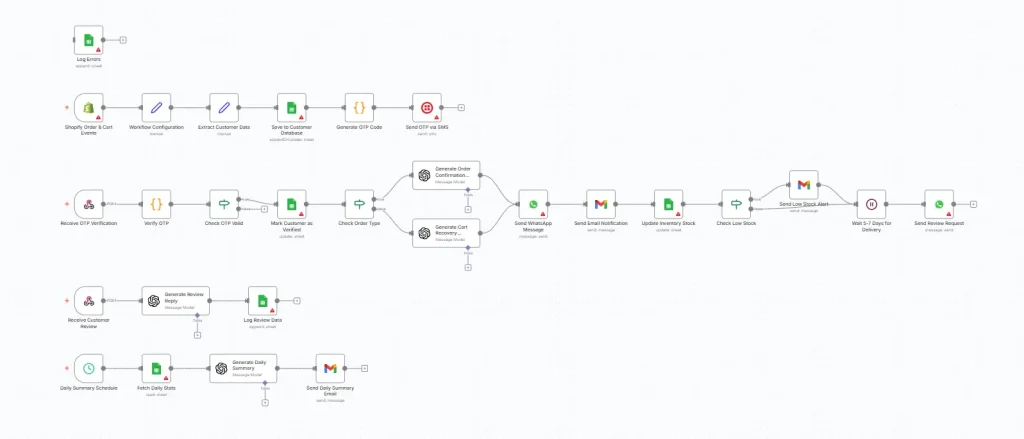
E-commerce / Shopify AI Order Support + Inventory Sync + Review Generator Workflow
Automate your Shopify operations with AI-powered order support, real-time inventory updates, and intelligent review management.
🚀 Overview
This smart AI automation workflow, built with n8n, connects your Shopify store, Google Sheets, Twilio, WhatsApp, Gmail, and OpenAI to streamline your store’s operations.
When a customer places or abandons an order, the system automatically:
✅ Captures customer details
✅ Sends mobile/email OTP for verification
✅ Updates product stock in real-time
✅ Requests and responds to reviews intelligently using AI
✅ Notifies store owners instantly via WhatsApp or email
This end-to-end automation saves hours of manual work and delivers a seamless shopping experience for your customers.
⚙️ Step-by-Step Setup Guide
1️⃣ Shopify Connection
-
Connect your Shopify store to the “Shopify Order & Cart Events” trigger node in n8n.
-
This node listens for new orders, cart abandonments, or order updates in real-time.
2️⃣ Google Sheets Setup
Create four Google Sheets for seamless data management:
-
Customer Database
Columns:customerName,customerEmail,customerPhone,productName,orderId,orderTotal,orderDate,orderStatus,verified,reviewStatus -
Inventory Sheet
Columns:productName,stockQuantity -
Reviews Sheet
Columns:customerEmail,reviewText,reviewReply,timestamp -
Error Logs Sheet
Columns:errorMessage,nodeName,timestamp,orderDetails
📋 Add each Google Sheet Document ID inside its corresponding n8n node:
-
Save to Customer Database
-
Mark Customer as Verified
-
Update Inventory Stock
-
Log Review Data
-
Fetch Daily Stats
-
Log Errors
3️⃣ Workflow Configuration Node
-
Set your store owner email address here to receive workflow updates and error alerts.
4️⃣ Twilio SMS Setup
-
Add your Twilio phone number to the node named “Send OTP via SMS”.
-
Used to send OTP verification messages to customers.
5️⃣ OpenAI API Setup
-
Connect your OpenAI account in all AI-powered nodes.
-
These nodes generate smart replies for customer reviews and personalized messages for order confirmations.
6️⃣ WhatsApp Business Cloud API
-
Configure your WhatsApp Business API credentials.
-
This enables the system to send:
-
Order confirmation messages
-
Abandoned cart reminders
-
Review requests and thank-you messages
-
7️⃣ Gmail Integration
-
Connect your Gmail account to send email notifications for every important workflow event (e.g., new order, error log, daily summary).
8️⃣ Webhooks Setup
Create and note these webhook URLs:
-
Receive OTP Verification: For customer OTP submissions
-
Receive Customer Review: For collecting review responses
✅ Before Executing the Workflow, Double-Check:
| Node Name | Configuration Required |
|---|---|
| Shopify Order & Cart Events | Set Shopify credentials |
| Save to Customer Database | Add valid Google Sheet ID |
| Send OTP via SMS | Add Twilio credentials + phone number |
| Mark Customer as Verified | Add valid Google Sheet ID |
| Send WhatsApp Message | Add sender ID + WhatsApp Business credentials |
| Update Inventory Stock | Add valid Google Sheet ID |
| Send Review Request | Add sender ID + WhatsApp Business credentials |
| Log Review Data | Add valid Google Sheet ID |
| Fetch Daily Stats | Add valid Google Sheet ID |
| Log Errors | Add valid Google Sheet ID |
| Workflow Configuration | Add store owner email |
💡 What You’ll Achieve
-
Automated Order Support: Instant OTP verification + smart follow-up.
-
AI-Driven Review Replies: Personalized, professional responses crafted by OpenAI.
-
Inventory Sync: Real-time stock updates across your database.
-
Customer Engagement: WhatsApp & Gmail notifications to improve trust.
-
Error Tracking: Every issue logged automatically for transparency.
🧠 Why Choose PageOptimum?
Contact Us Today — our team will help you set it up end-to-end!